https://onlineedlreg.dotm.gov.np/newDlApplicationEntryResult_.action?successMessage=APPLICATION+SAVED+SUCCESSFULLY+REFERENCE+NO%3A+2910151968875&referenceNo=2910151968875&applicantfullname=Rassm+Prassdfsad+Landfs®date=12%2F25%2F18&status=Registered&citizenshipnumber=123007%2F123&expiryDate=N%2FA&bloodgroup=B%2B&dobStr=08-Jan-1999&mobilenumber=8203252311&selectedcategories=A&fathername=Eee++pufdai&Address=Lahan+02+Shari+Koshi+Nepal&appointmentDate=15%2F11%2F18&applyZone=Koshi&applyOffice=Koshi
Showing posts with label Hackers Movies. Show all posts
Showing posts with label Hackers Movies. Show all posts

MASTER IN HACKING
https://www.youtube.com/playlist?list=PLAaMs54jGf5V7-2nn2RkKCfaWhw1InRIF
https://www.youtube.com/playlist?list=PLAaMs54jGf5V7-2nn2RkKCfaWhw1InRIFhttps://www.youtube.com/watch?v=B5SZLcZHVKE
https://www.youtube.com/playlist?list=PLAaMs54jGf5V7-2nn2RkKCfaWhw1InRIFhttps://www.youtube.com/watch?v=B5SZLcZHVKE
Ethical Hacking Course in English Step by Step
Install IPSW File on iPhone iPad with/without iTunes
https://ipsw.me/#!/version
https://www.android-iphone-recovery.com/install-ipsw-file-on-iphone-ipad-without-itunes.html
There are many situations that we will make in daily,and need to install IPSW file on our iPhone/iPad,for example update iPhone from iOS 10 to iOS 11 official version; install iOS 11 on iPhone/iPad; downgrade iOS 11 to iOS 10.3.3 on iPhone and iPad; fix the software update failed error; get iPhone out of recovery mode/DFU mode; fix iPhone/iPad stuck in black screen of death; fix iPhone stuck at Apple logo; repair an iPhone stuck at looping on start; fix device abnormal system issue; failed restore device to factory reset,etc.You would be required to downgrade from iOS 11 to iOS 10 to fix/restore iPhone back to factory setting status.Whatever the case, we’ll walk you through the entire process to fix bricked iPhone/iPad and gets it back to normal status by re-installing IPSW files(firmware package) on iPhone/iPad with/without iTunes.But before we get into those,be sure to backup your device,in case something goes wrong during the procedure.We highly recommend that you don’t move forward until or unless you’ve made a proper backup of your device.
You may want to know:How to Backup iPhone to Computer
You may want to know:How to Backup iPhone to Computer
Download & install iOS IPSW File Manually for iPhone, iPad
There are a few routes you can take when it comes to installation of iOS.The manually one is to download & install iOS IPSW file on iPhone/iPad with iTunes,it’s easy to complete the restoring task via iTunes on device.However,it gain the big chance to lost data from device after using IPSW file to restore the jailbroken iPhone/iPad with iTunes.Below we have shown method on how to download & install iOS iPSW file manually for iPhone /iPad with iTunes.
Part 1:Install IPSW File on iPhone iPad With iTunes (Lead to Data Loss)
Step 1.Download the iOS IPSW file[ links below ] that relates to your specific iOS device.
Step 2.Run iTunes.
Step 3.Connect your device to the computer.
Step 4.Open Device Summary for the iOS device you are updating.
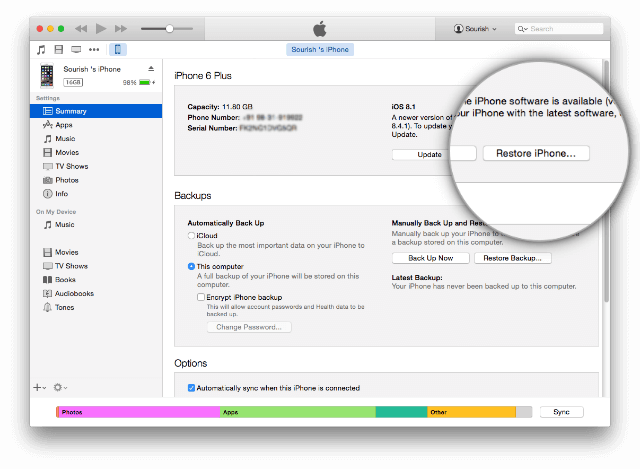
Step 5.Hold down the SHIFT [ Windows ] or ALT [ Mac ] key and click Restore in iTunes simultaneously iTunes restore.
Step 2.Run iTunes.
Step 3.Connect your device to the computer.
Step 4.Open Device Summary for the iOS device you are updating.
Step 5.Hold down the SHIFT [ Windows ] or ALT [ Mac ] key and click Restore in iTunes simultaneously iTunes restore.
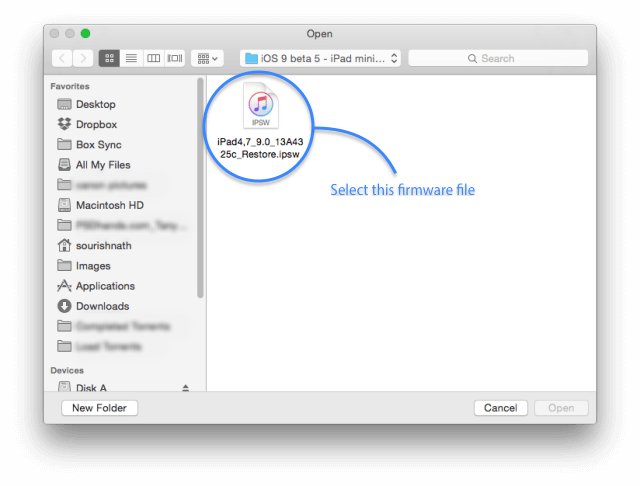
Step 6.Locate the iOS IPSW file you downloaded and select it.
Step 7.Follow the on onscreen instructions and iTunes will begin the update process.
Step 8.When the update has finished, your iOS device will reboot into the iOS you select.
Step 8.When the update has finished, your iOS device will reboot into the iOS you select.
Please download the .IPSW files:
Part 2:Install IPSW File on iPhone iPad Without iTunes (No Data Loss)
Another better way to use IPSW file to restore iPhone/iPad without iTunes is install IPSW file on device via IPSW Files Installation Tools or IPSW Restore Tool – iOS System Recovery.No matter the jailbroken or non-jailbroken iDevice,it will not lead to data loss in the whole restoring process.IPSW Files Installation Tools-iOS System Recovery perfectly help to install IPSW file on iPhone/iPad without iTunes,so you can use this auxiliary tools to update or downgrade your iOS devices without data loss.What’s more,this program allow to restore deleted data from iPhone/iPad completely after losing data under any circumstances.Additionally,it also designed for restore iOS system to normal state on iPhone/iPad.
Features of iOS System Recovery:
* Provides the latest iOS 11 firmware package .IPSW files downloading and install on iPhone/iPad without data loss;
* Install IPSW file on iPhone/iPad without data loss;
* Fix/Repair iPhone iPad device stuck in Recovery Mode;
* Get iPhone iPad out of Apple Logo screen/ iTunes screen/ loading screen/ white screen;
* Fix iPhone iPad can’t enter the system;
* Without any data loss during the repairing process.
* Provides three recovery mode for lost contacts, iMessages/SMS/MMS, photos, videos, call logs, notes, etc, on iPhone iPad device: Directly recover data on iPhone iPad device; Restore data from iTunes backup; Retrieve data from iCloud backup.
* Supported iPhone, iPad devices: iPhone X/8/7/6S/6S Plus/6/6 Plus/5S/5C/5/4S, iPad Air 2/3, iPad Pro 3, iPad Mini, iPod Touch 4/5, etc,.
* Install IPSW file on iPhone/iPad without data loss;
* Fix/Repair iPhone iPad device stuck in Recovery Mode;
* Get iPhone iPad out of Apple Logo screen/ iTunes screen/ loading screen/ white screen;
* Fix iPhone iPad can’t enter the system;
* Without any data loss during the repairing process.
* Provides three recovery mode for lost contacts, iMessages/SMS/MMS, photos, videos, call logs, notes, etc, on iPhone iPad device: Directly recover data on iPhone iPad device; Restore data from iTunes backup; Retrieve data from iCloud backup.
* Supported iPhone, iPad devices: iPhone X/8/7/6S/6S Plus/6/6 Plus/5S/5C/5/4S, iPad Air 2/3, iPad Pro 3, iPad Mini, iPod Touch 4/5, etc,.


The following part we will take an example on how to install iOS 10.3.3 IPSW file on iPhone with IPSW Files Installation Tools-iOS System Recovery.
Easy Steps to Download and Install iOS 9/iOS 10 IPSW File on iPhone without Data Loss
Step 1.Run the IPSW Files Installation Tools and Connect iPhone to Computer
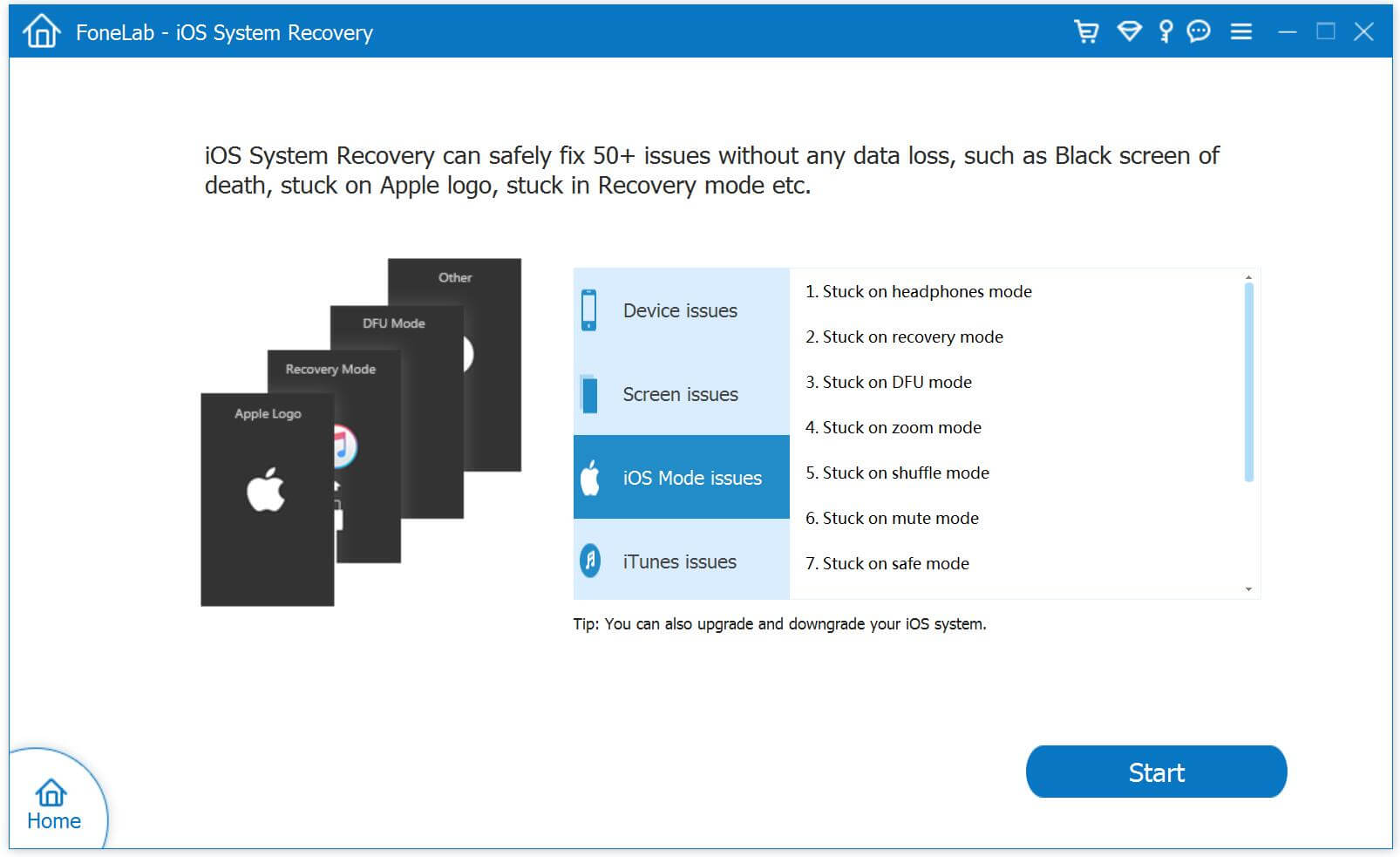
Step 2.Select iOS 11/10/9 Firmware Files and Download to iPhone
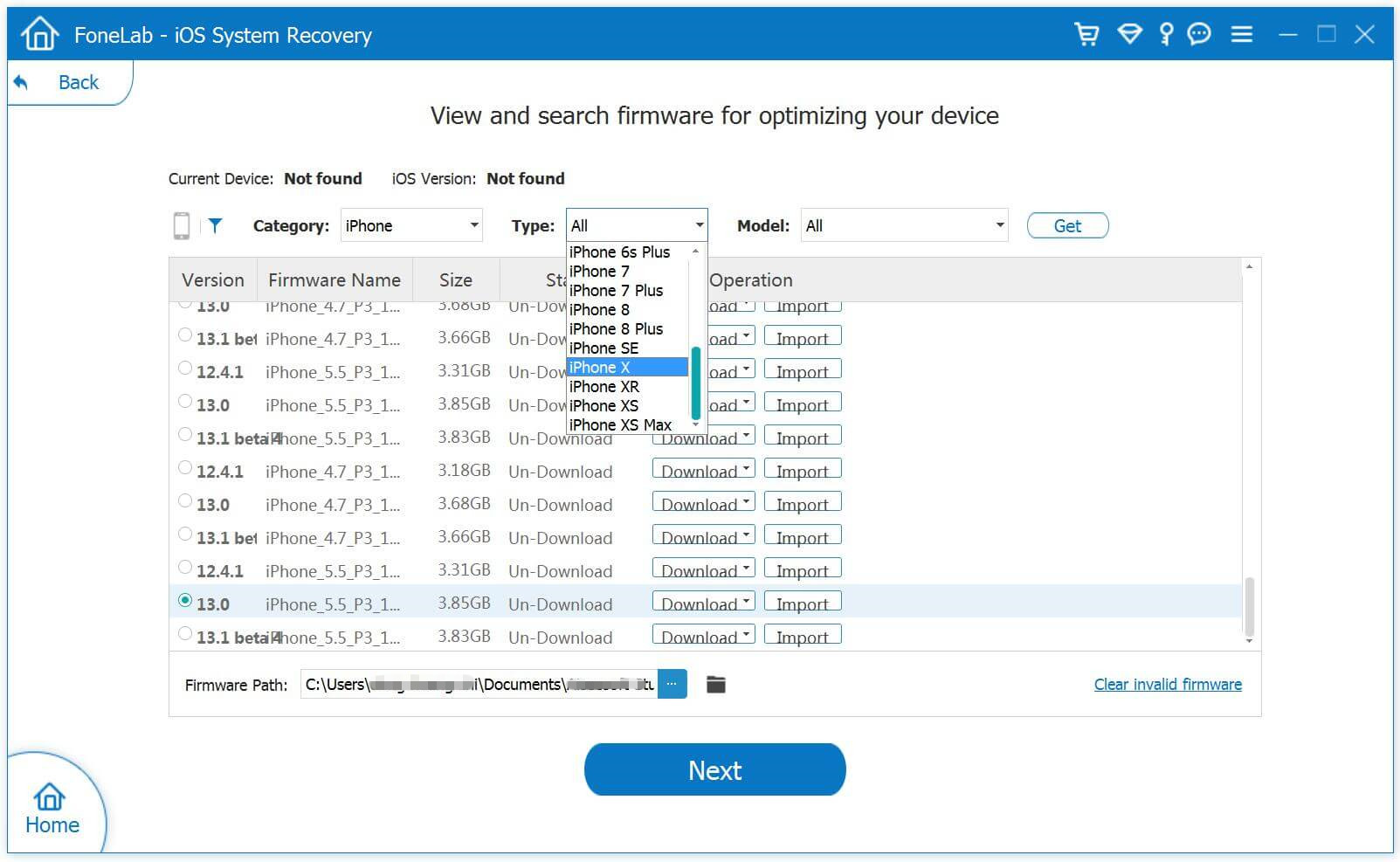
Tips:The program provides iOS 10.3.3 and the newest iOS 11 official version firmware package for download.
1)If you want to install iOS 10 on your iPhone directly,please click the “Download” button to download the iOS 10.3.3 firmware files for your iPhone.
2)If you want to install iOS 10/iOS 9 or other older IPSW file on iPhone,please select and install the .IPSW files on your iPhone via IPSW Files Installation Tools(no data loss),then save it on your computer.
Please download the .IPSW files in below download page:
Step 3.Locate the Downloaded iOS 9/iOS 10 or iOS 11 .IPSW File from PC to Program
To install the iOS 9 or iOS 10 .IPSW File on your iPhone,please click the “Select” button the import the files to the IPSW Files Installation Tools and going on.
To install the iOS 9 or iOS 10 .IPSW File on your iPhone,please click the “Select” button the import the files to the IPSW Files Installation Tools and going on.
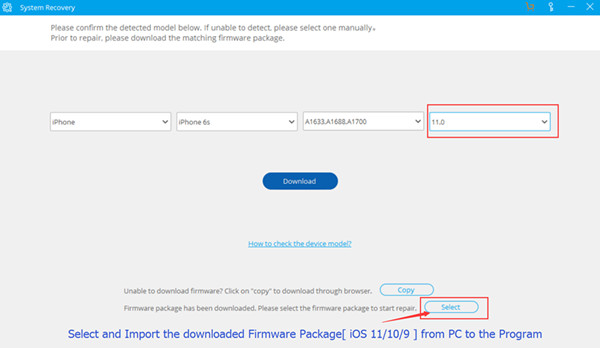
Tips:If you want to install iOS 10.3.3 on your iPhone, iPad or iPod touch,please select,download and install it on your iOS devices directly,during the installing process,it won’t cause data loss.
Step 4.Install the iOS 11/10/9 IPSW File on iPhone without Data Loss
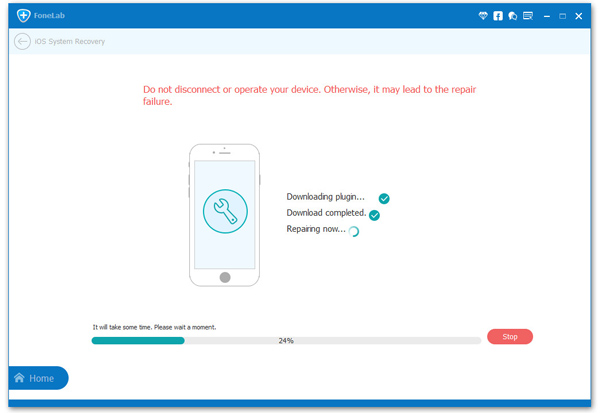
Note:Once finish this restoring job, your iPhone/iPad/iPod Touch will be updated to the iOS version which you select. If your iOS device is a jailbroken one, then it will be updated to non-jailbroken.If you have unlocked your iOS device before, then it will be re-locked again.
Free download the IPSW Files Installation Tools and have a try!
------------------------------------------------------------------------------------------------------
how to restore iphone 4,4s,5,5c,5s,5se ,6,6plus,6s, 6splus, 7, 7plus ,8 and 8 plus or X ,ipad or ipod or any idevice
how to fix bootloop iphone 4,4s,5,5c,5s,5se,6,6plus,6s, 6splus, 7+, 7,8 and 8 plus ipad ipods or any idevice
How to remove/reset any disabled or Password locked iPhones X, 8 and 8 + 7,7plus 6S & 6/Plus/5s/5se/5c/5/4s/4/iPad or iPod or any idevices
how to update iphone 4,4s,5,5c,5s,5se,6,6plus,6s, 6splus, 7, 7plus ,8 and 8 plus or X or ipad
remove passcode disble iphone
reset iphone, disable iphone unlock,
Note - pleasee make sure all data backup your device
After this process your data will be erased
pleasee make sure your fmi ( find my iphone ) off . if fmi is on icloud id you know ...go to www.icloud.com and login id password..
annd select find iphone , and all devices and choose your phone and remove iphone ..
if u find icloud unlocking service
go twiter @ddeli2o ( dim )
_____________________________________________________-
REUIRMENTS
1. PC OR LAPTOP
2. DATA CABLE ORIGNAL ONLY
3. YOUR IDEVICE
4. ITUNES http://adf.ly/1gWBR4 or http://apple.co/1RQqYqu
5. IPSW FILE FOR SEPCIFIC MODEL http://adf.ly/1gWBZR or http://bit.ly/1znxPLj
.__________________________________________________
Please make sure your data backup after this process your all data lost
1. U need to download latest firmware file here
2. open the pc or mobile browser
3. type ipsw.me in google or click here http://adf.ly/1gWBZR or http://bit.ly/1znxPLj
4. open the site and select iphone
5. select your iphone or ipad or ipod model
6. and list show the latest software or firmware note only download latest firmware or software
7. select latest firmware
8. download it file size min 1gb to max 3gb
9. if u download the pc please use idm or if using mobile please use ucbrowser
10. After download the itunes here http://adf.ly/1gWBR4 or http://apple.co/1RQqYqu
11. install the itunes in pc pleasee check your win 32 or win 64 after install
12. Open the itunes after install it
13. Go to iphone or ipad or ipod And swich off
14. Hold home key and plug the usb cable or data cable -- 10 sec hold ---
▬▬▬▬▬▬▬▬▬▬▬▬▬▬▬▬▬▬▬
-----in case your phone home button damage than
A. connect your phone data cable to pc
b. HOld POwer button and vol down both [ 8 to 10 sec]
c. when phone screen off 2 to 3 sec release power button
d continue HOld vol [ min 4 to 6 sec ]
e Now to detect your phone intunes in recovery mode----
▬▬▬▬▬▬▬▬▬▬▬▬▬▬▬▬▬▬▬
15. detect in recovery mode
16. hold shift key and click tab restore iphone
17. select the ipsw file
18. and continue the restore
19 process time minimum 5 min to 10 min max
20 after the your device automatic restart
21 . setup the iphone or ipad or ipod
22. Congress ur idevice restore complete
____________________________________________________-
donate to me on paypal
https://www.paypal.me/Sunitq
please support
------------------------------------------------------------------------------------
Note i f u have iphone X or 10
connect to pc
hold vol down + power button for 10 sec
after screen goes black for 3 sec than release power button
now your iphone x or 10 in recovery mode
Background music or intro and Outro
Itro & Tobu - Cloud 9 NCS Release
• NCS Spotify: http://bit.ly/SpotifyNCS
Itro:
Music video link https://youtu.be/VtKbiyyVZks
➞ Spotify http://open.spotify.com/artist/6fEZjg...
➞ Facebook https://www.facebook.com/officialitro
➞ Twitter https://twitter.com/itromsc
➞ YouTube https://www.youtube.com/user/official...
➞ SoundCloud https://soundcloud.com/itro
______________________________________________________
special thanks to ipsw.me site
for easy provided latest to latest ipsw files for restoring idevices
Motorola Nexus 6 bypass GOOGLE ACOUNT Marshamllow ( API 6.0.1) on June 1 2016 security patch with out developer option

1. next WELCOME SCREEN
2. hold ',' till setting button ICON
3. langugage
4. click on setting icon
5. press " help and support"
6. type any text eg.: "select me"
7. select all text "select me"
8. click on " share me"
9. click on "message "
10. type any number eg: 112
and then check button ON
11. click on send button
12. press 'right above' button symbol like ' +'
13. look in 'left above' array as ' back 'symbole will come
14. press KeyBOad icon
15. type *#*#4636#*#*
16. go to "user information"
17. click on "back icon"
18. now u wll go "setting option"
NOW follow viedo






Subscribe to:
Comments (Atom)


